Portable PC gaming offers two different kinds of freedom. A Steam Deck lets you play PC games on a sofa, train, or hotel bed without finding a desk. A gaming laptop travels too, but trades handheld simplicity for a larger screen, stronger hardware, and a full keyboard. In the Steam Deck vs gaming laptop debate, the best choice depends less on specifications than on how you actually play.
Quick verdict: convenience or versatility?
Choose the Steam Deck if you want relaxed, controller-friendly games in places where opening a laptop feels awkward. Choose a gaming laptop if you play demanding releases, competitive shooters, strategy titles, or need one machine for gaming and work.
Neither wins every category. The Deck is easier to pick up for a short session; a capable laptop is a more flexible primary PC. That distinction matters more than price alone.
Portability: the Steam Deck works without a desk
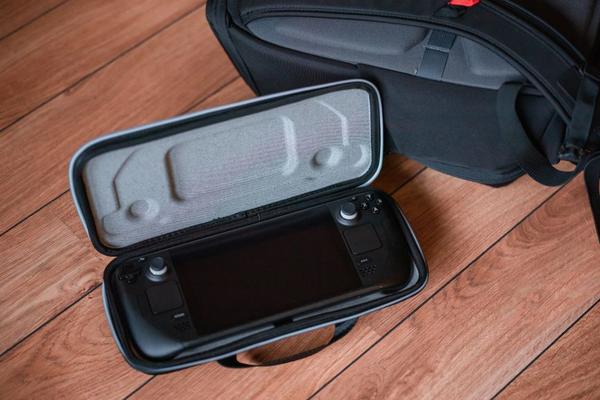
The Steam Deck is a handheld gaming PC with a built-in screen, thumbsticks, triggers, trackpads, and speakers. The OLED model weighs approximately 640 grams, making it easier to use on a bus or sofa than a conventional laptop. It still needs a protective case and takes up bag space.
A gaming laptop has its own display and keyboard, but comfortable play generally requires a stable surface. Larger models also have substantial charging bricks. At cafés or hotel desks, a slim laptop works well. For gaming in your hands without a table, the Deck has the advantage.
Gaming performance: laptops offer a higher ceiling
The Steam Deck targets its 1280 x 800 display using a compact AMD processor with integrated graphics. Indie games, older releases, and well-optimised titles can feel excellent. Demanding new games may require lower settings, upscaling, or a 30 fps target; some will still struggle.
A modern gaming laptop with dedicated graphics can achieve higher frame rates, sharper resolutions, and stronger ray-tracing effects. Yet laptops differ enormously. GPU power limits, cooling, memory, and processor choices affect results, so a budget machine is not automatically better than a Deck.
The gap is especially apparent on an external monitor. Docking the Deck adds a bigger screen and peripherals, not extra graphics power. A capable laptop is better suited to high-refresh-rate gaming. Before paying for performance you might never use, consult a PC gaming graphics settings guide to understand sensible targets.
Battery life: the game changes everything
Valve rates the Steam Deck OLED’s 50 Wh battery for approximately 3 to 12 hours of gameplay depending on the title. The LCD version has a 40 Wh battery and a stated 2-to-8-hour range. Lightweight games can last far longer than demanding blockbusters.
Some gaming laptops offer good battery life for browsing, but that does not translate into equally long gaming sessions. Demanding games drain batteries quickly, and unplugged laptops may reduce performance. Check game-specific battery tests, not general manufacturer endurance figures, before choosing a travel setup.
Game compatibility: check your favourites first
This is a crucial part of the Steam Deck vs laptop comparison. SteamOS is Linux-based and can run many Windows games through Proton. Compatibility is not universal, however. Certain anti-cheat systems, multiplayer games, launchers, and platform requirements can prevent games from working.
Steam’s Deck Verified categories provide a helpful starting point, but you should check each game’s latest status. Updates can introduce new issues, and a game launching successfully does not guarantee that every online feature works.
A Windows gaming laptop generally offers broader access to launchers, multiplayer games, mods, and Windows applications. Both devices can play many installed games offline, but individual titles may require an initial sign-in or periodic authentication. Confirm this before travelling without internet.
Controls, displays, and everyday usefulness
The Deck’s built-in controls suit platformers, racing games, action adventures, and many role-playing games. Configurable trackpads help with mouse-oriented titles, though tiny text and complicated menus can still frustrate. Its OLED model has a 7.4-inch HDR screen with up to a 90 Hz refresh rate; not every game will reach 90 fps.
A laptop feels more natural for competitive mouse aiming, strategy games, fast keyboard shortcuts, and productivity tasks. You can connect a monitor, keyboard, and mouse to the Deck, but that reduces its convenience advantage. A handheld gaming accessories guide can help you decide whether a dock is worth buying.
Price and value: consider the entire setup
The Deck often costs less than a gaming laptop with capable dedicated graphics, although region, availability, storage capacity, and discounts affect prices. Extra storage may be useful if you install several large games. External monitors, docks, and keyboards are optional, not essential, Deck expenses.
A gaming laptop may cost more, but includes a larger display, keyboard, familiar Windows environment, and greater non-gaming flexibility. Already have a computer? The Deck makes sense as a second device. Need one machine for everything? A laptop may offer better overall value. A gaming laptop specifications guide can help identify upgrades worth paying for.
A practical way to decide
Imagine a 45-minute commute spent playing indie games or single-player adventures. The Deck is appealing because you can play without unfolding a laptop. Now imagine spending evenings in online shooters at a desk and mornings editing videos. The laptop serves both activities better.
Before ordering, list the five games you play most. Check their current Deck compatibility, control schemes, and performance, then think about where you normally sit. That exercise can be more revealing than a benchmark chart.
Frequently asked questions
Can a Steam Deck replace a gaming laptop?
Sometimes, for controller-friendly games and basic desktop tasks. It is less practical if you need Windows-only software, substantial computing power, or regular keyboard-based work.
Is a gaming laptop always faster than a Steam Deck?
No. It depends on the components and cooling. A laptop with powerful dedicated graphics can be much faster, but not every budget laptop qualifies.
Can you play Steam games offline on both?
Often, after installation and any required initial authentication. Some games and launchers still need internet access, so test your favourites before departure.
Which is better for travel?
The Steam Deck is generally more convenient for handheld sessions without a desk. A laptop works better for trips involving typing, work, or games that benefit from a larger screen.
Which should you buy?
For portable play built around comfort and spontaneous sessions, the Steam Deck is the more convenient companion. For higher performance, wider compatibility, and one-device versatility, a gaming laptop wins. Choose according to the games you actually play and the places you actually play them.